
Here are the steps to disable auto fill for online meeting in meetings:
To disable the auto filled meetings please go to File > Options > Calendar and uncheck the option "Add online meeting to all meetings".
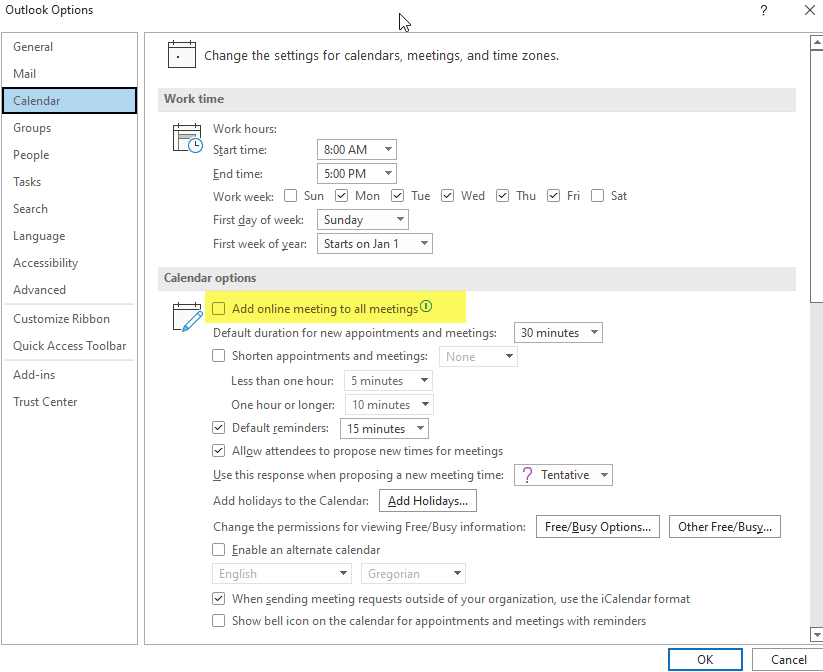
This page explains how to turn off the automatic addition of Microsoft Teams meeting links to every new Outlook calendar invite — useful for anyone who wants to create in-person or non-Teams meetings without a Teams link being added by default.
Here are the steps to disable auto fill for online meeting in meetings:
To disable the auto filled meetings please go to File > Options > Calendar and uncheck the option "Add online meeting to all meetings".
 Made with DASH A.i.
When Outlook is configured to add a Teams link to all meetings automatically, every new calendar invite will include an online meeting link — even for in-person events. Follow the steps below to turn this off.
Step-by-step instructions:
Tip: After unchecking this setting, you can still add a Teams link to individual meetings manually by clicking Teams Meeting in the ribbon when composing a new invite — this setting only removes the automatic addition.
In practice… If colleagues are still seeing Teams links auto-added after following these steps, they may need to restart Outlook for the change to take effect.
0 files attached to this page