Items that need to be entered:
-
Left Hand Panel
-
Session Title
-
Session Description
-
Start Date and Time
-
End Date and Time
-
Continuing Education Credits
- Individual Checkboxes for CE, CLE and CPE
-
Connect existing Speaker
- Search by name (it’s always better to have added speakers to the system first, before linking them to the session)
-
-
Right Hand Panel
-
Rooms (you can add rooms from this screen, make sure to add “parent room” as meeting)
-
Type:
-
For ALTA ONE:
-
Either Notable or Engagement Lab
-
Both Notables and Engagement Labs should ALSO be tagged Professional Development
-
-
For other meetings, tag as Professional Development and/or whatever language is used for sessions.
-
-
Meeting
- Use check box to select
-
Tracks
- Use check box to select
-
Post Attributes
-
Order
- Go by 10s in case something needs to be slotted in between
-
-
PUBLISH
-
Additional Information
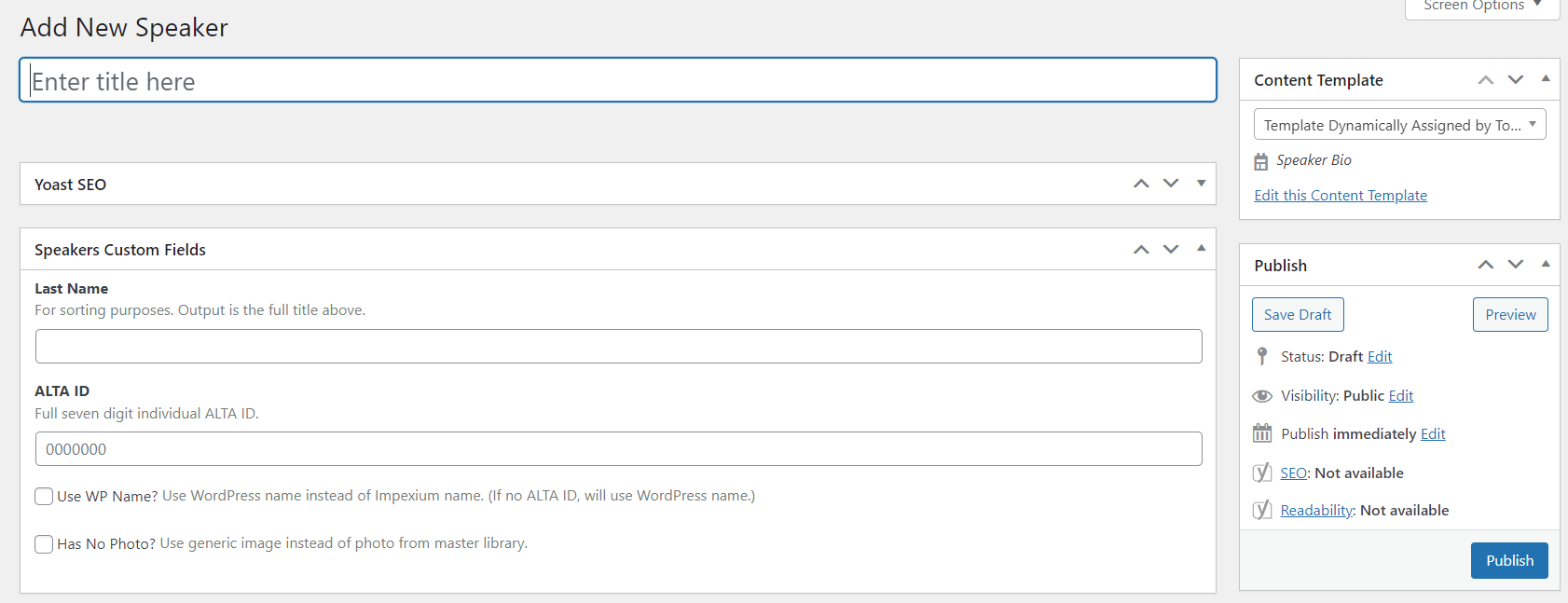
Speakers:
-
Works better to add speakers into system before linking them to a session
-
Enter Title Here = Name of speaker (helps locate them when linking to session)
-
Last Name = Last Name (for sort order)
-
ALTA ID = ALTA ID (links the bio and photo)
-
Optional Items:
-
Use WP Name? Use WordPress name instead of re:Members (formerly Impexium) name. (If no ALTA ID, will use WordPress name.)
-
Has No Photo? Check this if there is no headshot uploaded
-
-
PUBLISH
Tracks:
In general, the tracks are pretty similar from ALTA ONE to ALTA ONE. Each track should have its own color from the ALTA ONE style guide. Tracks used in prior years can be tweaked to match the current year’s tracks (though this will change the track name from prior years). For example, it’s not a big deal if “Business Operations” gets changed to “Operations.”
