Full Title: New Individual Account Request for an Existing Organization NOT in the Registry (IS PC or SC)
Short Description: This template is used when setting up a new individual account for an existing organization that is NOT in the Registry AND the individual is either a primary or secondary contact.
Template:
Thank you for your request for a new ALTA login and password for www.alta.org.
You should have just received a link to set your ALTA password via email. Your login is your email address.
If you have not received it, please check your SPAM or JUNK folders.
Also, while setting up your login I noticed that [Insert Company Name and ALTA ID] is NOT listed in the ALTA Registry (www.altaidregistry.org).
If you are not familiar with the ALTA Registry, it is the industry “phone book” of underwriter confirmed title agents (used by lenders and transaction participants to find title agents and confirm they are working with an agent that has active underwriter relationships). A listing in the ALTA Registry is free and does NOT require membership with ALTA.
It is important to note that to be listed in the Registry, an agent must request confirmation from their underwriters. A Registry listing is NOT “automatic” with ALTA membership and/or policy forms licensing.
If you are interested in adding your listing, I’ve included steps for accessing the Registry Management System to send a listing request to your underwriter(s).
Or if it is easier, I’d be happy to assist with getting the listing request submitted to your underwriters, just let me know and I’ll follow up with what details are needed.
For more information on the ALTA Registry, visit www.alta.org/registry.
Accessing the Registry Management System
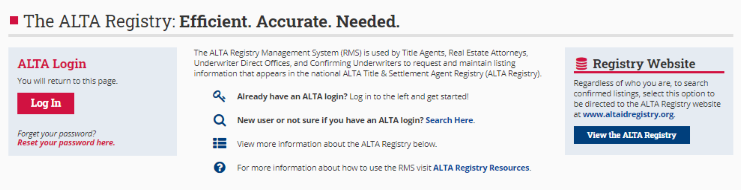
- Go to www.alta.org/registry and enter your ALTA login and password (screen shot below).
- Follow the on-screen instructions.
Thank you,
The ALTA Registry Team
Keywords:
Related SOPs:
 Made with DASH A.i.
This template applies in a specific combination of circumstances — use it as a checklist before sending:
- ✅ The organization already exists in ALTA's records
- ✅ The individual being set up is a Primary Contact (PC) or Secondary Contact (SC)
- ✅ The organization is NOT currently listed in the ALTA Registry (
www.altaidregistry.org)
Tip: Confirm all three conditions are true before using this template. If the organization is in the Registry, a different template may apply. If the individual is not a PC or SC, check for the appropriate variant.
Made with DASH A.i.The template below is sent to the new account holder. Key components of the message are broken down here for clarity.
What the template covers:
- Account confirmation — Notifies the user their login (email address) and a password-set link have been sent
- Spam/junk folder reminder — Prompts the user to check if the email isn't in their inbox
- Registry gap notification — Flags that the user's company is not listed in the ALTA Registry, citing the company name and ALTA ID
- Registry explanation — Describes the Registry as a free, lender-facing directory of underwriter-confirmed title agents; clarifies it is not automatic with ALTA membership or policy forms licensing
- Two paths to get listed — The user can follow the self-service steps OR ask ALTA staff to assist
- Accessing the Registry Management System — Directs the user to
www.alta.org/registrywith their new ALTA login credentials
In practice: Remember to fill in [Insert Company Name and ALTA ID] before sending. Leaving this placeholder blank undermines trust and looks like an error to the recipient.
Made with DASH A.i.No keywords have been added to this page yet. Keywords help staff search for and surface the correct template quickly.
Suggested keywords to consider (pending admin review): new account, individual account, existing organization, not in registry, primary contact, secondary contact, ALTA Registry, Registry Management System, account setup, PC, SC
Made with DASH A.i.No related SOPs have been linked yet. Connecting related pages helps staff navigate between templates for similar but distinct scenarios.
In practice: Consider linking SOPs for:
- New individual account where the organization IS in the Registry
- New individual account where the organization does not yet exist in ALTA's system
- Registry listing request workflows
- General new account setup procedures