Full Title: ALTA Registry Mailbox - Daily Checklist
Short Description: This procedure document provides a daily check list of items to be received in the ALTA Registry mailbox and action items when those items are not received.
Business Rules: Each day the ALTA Registry mailbox must be reviewed to ensure a series of emails are received. When those items are not received, it is an indicator that a Registry process did not work as designed and likely requires remediation of some sort.
Tips | Tricks | Hints:
The Thaddeus overnight dashboard provides an overview of each stage of the overnight process and may help identify at what point overnight processing failed, preventing the Registry JSON push.
https://dw.alta.org/dashboard-nightly.php
Step-By-Step:
Morning
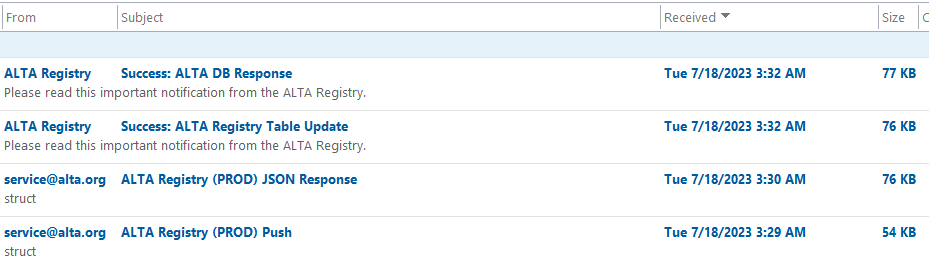
170 170 incomplete Check for the four emails that are received after the nightly script and Registry JSON process has completed. 171 171 incomplete ALTA Registry Success: ALTA Registry Table Update (from Registry website) 172 172 incomplete if Error is in the Subject line (open file and remediate errors). 173 173 incomplete ALTA Registry Success: ALTA DB Response (from Registry website) 174 174 incomplete ALTA Registry (PROD) JSON Response (from ALTA overnight processes) 175 175 incomplete ALTA Registry (PROD) Push (from ALTA overnight processes)
- Example of a successful nightly Registry process.
-
If the Registry "Success" email shows an Error, open the attachment to determine the record that did not process appropriately.
-
The most common error is a missing email, this occurs for two reasons,
-
The record is being deactivated and the email address was removed from re:Members (formerly Impexium) prior to the nightly processing. ACTION - No action required.
-
An email address was removed and the record is in the Registry. ACTION - add the email address to re:Members (formerly Impexium) and allow the nightly process to run.
-
-
-
If the 'ALTA' emails are received, but the 'Registry' emails are not, this indicates and issue on the Registry side of the process. ACTION - Send an email to vendor contact at FPT to investigate what caused the email to not be sent. Usually we find that the issue is with the email trigger it self and not the processing of the nightly JSON file.
-
If NO emails are received, this indicates an issue with the nightly snapshot, change log, and JSON push/response process. Typically IT will notice when a nightly script issue occurs, however if you have not seen an update, submit a ConnectWise Ticket.
-
Once the emails are confirmed to be processed as expected, they can be deleted from the inbox.
Afternoon - 1pm to 2pmET timeframe
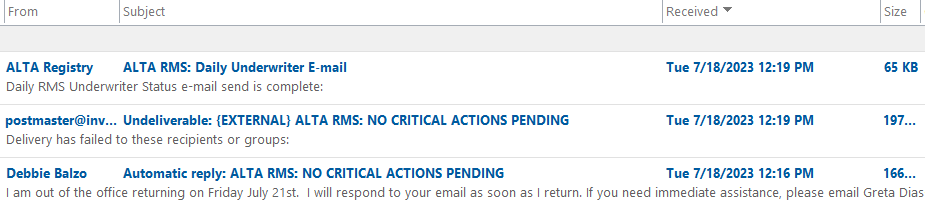
176 176 incomplete Check for the two mid-day confirmation emails that indicate the Underwriter Daily Critical Action Email was sent and the daily E&O expirations email was sent. 177 177 incomplete ALTA RMS: Daily Underwriter Email 178 178 incomplete Open the email and scan for any underwriter that seems to have an outsized portion of critical action items, which may indicate a change in employees (or PTO) and a new resource was not assigned to perform Registry confirmation. ACTION - reach out to individuals with role type Registry Underwriting Contact (see relationships) to inquire about the outstanding items. 179 179 incomplete When the Underwriter Daily Critical Action Email is sent, it will usually trigger several 'Out of Office' response emails from employees out of the office. ACTION - Delete the Out of Office auto response emails. 180 180 incomplete ALTA RMS: E&O Document Expirations E-mail 181 181 incomplete This email indicates if the daily emails are sent that notify agents of uploaded E&O documents with an upcoming expiration. ACTION - If this email is NOT received, submit a ConnectWise Ticket.
-
Once the emails are confirmed to be processed as expected, they can be deleted from the inbox.
-
Example of ALTA RMS: Daily Underwriter E-mail and auto responses.
Other Commentary:
Other types of routine emails into the Registry mailbox include:
-
New Account Requests
-
E&O Document Errors
-
Registry Remove Fax Requests
Keywords:
Related SOPs:
To see a detailed grid of the Overnight Processes which run behind the scenes to move data from re:Members (formerly Impexium) to the ALTA ID Registry, visit https://alta200036.sharepoint.com/:x:/r/sites/ALTADataMashup/_layouts/15/Doc.aspx?sourcedoc=%7B6E378A50-9046-4A82-A81C-7F4CFD464B92%7D&file=Nightly%20Steps.xlsx&action=default&mobileredirect=true&CID=AC852940-BE68-4BF3-9B96-4B1D3B7DC1F1&wdLOR=cDE9712FF-25D5-497A-AF48-323A4414023C
