Full Title: Individual requesting access to the RMS has been made a primary or secondary contact
Short Description: Use this template when responding to an individual requesting access to the RMS, once you have made them either a primary or secondary contact on the Uber Parent record.
Text | Images | Step-By-Step:
Hello [INSERT NAME],
Thank you for your inquiry.
In order to access the Registry Management System (RMS), you must be either an ALTA primary or secondary contact on your company's top level (uber) parent record.
We have made you the [INSERT primary/secondary] contact so that you may request a Registry listing.
NOTE: You will not be able to access the RMS to request your listing until the next business day.
Please let us know if you have any further questions.
Accessing the Registry Management System
-
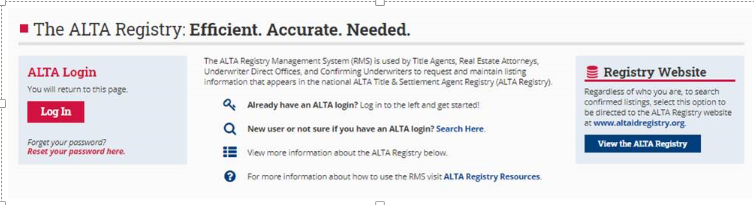
Go to www.alta.org/registry/rms.cfm and enter your ALTA login and password (screen shot below).
- If you do not have your login details, you can click the ‘Get a reminder here’ link just below the login box.
- If you do not have a record in the ALTA database, you can click the ‘Search Here’ link next to “New user or not sure if you have an ALTA login?” to start the process for creating your company record and individual ALTA login.
-
Follow the on-screen instructions.
Thank you!
