Full Title: Steps for : Adding E&O to your Registry listing.
Short Description: This template is used to provide instruction for adding E&O documents to a Registry listing.
Templates:
Hello [Insert Name],
To add E&O details and documentation to your Registry listing, follow the steps below using the ALTA Registry Management System.
Using the Registry Management System to append E&O details and documentation
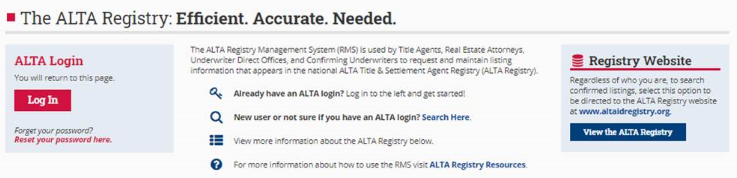
- Go to www.alta.org/registry/rms.cfm and enter your ALTA login and password (screen shot below).
- Select Manage My Office and Underwriters
- Select the E&O tab
- Use the drop down under ‘File Upload’ to find and select the E&O document on your system
- Select the location or locations the document is applicable to (click the circle to the right of the location)
- Select the green ‘ Upload Document’ button at the bottom of the page.
- Click ‘Continue’
- Once the document is loaded, review the data points and edit / add as necessary, and then click ‘Save Data Points’
If you have any questions, please let us know. Thank you.