To convert a branch into a PBL the first step is to remove the listing from the agents record in the RMS.
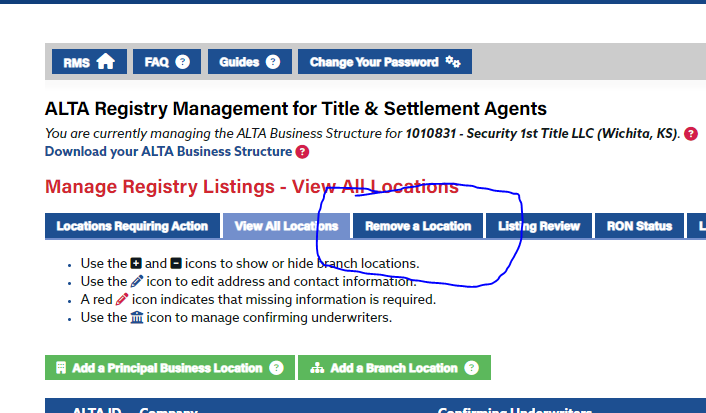
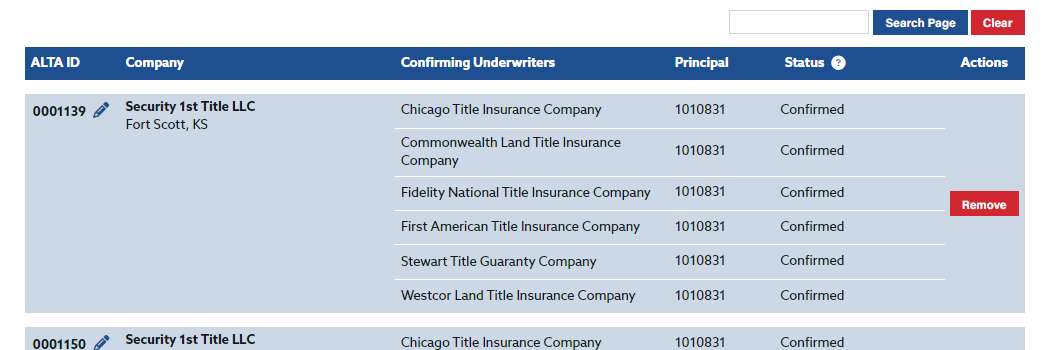
Then select Removed for the applicable branch or branches. Before this step is taken make a note of the Confirming Underwriters as these must be added back when the branch is added back as a PBL
 Made with DASH A.i.
To convert a branch to a PBL, the process begins in the agent's record inside the RMS. The branch listing must first be removed before it can be re-added in the correct PBL format. There are two key actions in this process, and one critical piece of information you must capture before making any changes.
Before you do anything else: Open the agent's record and note down all Confirming Underwriters associated with the branch. Once the listing is removed, this information will no longer be visible — and it must be re-entered when the branch is added back as a PBL.
Key points at a glance:
- The first action is always to remove the listing from the agent's record in the RMS.
- Use the "Removed" status for the applicable branch or branches — not deletion or archiving.
- This applies to one or more branches at the same time if multiple conversions are needed.
- Confirming Underwriters must be manually re-added when the branch is re-entered as a PBL — they are not carried over automatically.
In practice, it is helpful to screenshot the branch listing before selecting "Removed" as a quick backup reference for Confirming Underwriter details, in case notes are misplaced.