Full Title: How to remove an ALTA Registry Listing using the RMS
Short Description:
When it becomes necessary to remove a title agent listing from the Registry, ALTA Staff must either access the title agent's RMS portal to initiate the request to remove the listing from the Registry OR direct the title agent to do so.
This occurs when we are notified an agent is no longer in business.
NOTE that this process takes more than one day; removal from the Registry happens FIRST; then deactivation in re:Members (formerly Impexium) can proceed. Read on . . .
Business Rules:
-
If an organization is listed in the ALTA Registry, it MUST be removed PRIOR to deactivating a record in re:Members (formerly Impexium).
-
Once the request to remove the listing is complete in the RMS, you must wait until the next ALTA Overnight process is complete, prior to deactivating in re:Members (formerly Impexium) .
-
Also refer to re:Members (formerly Impexium Data Hygiene) - Organization Records Deactivation
Step-By-Step:
-
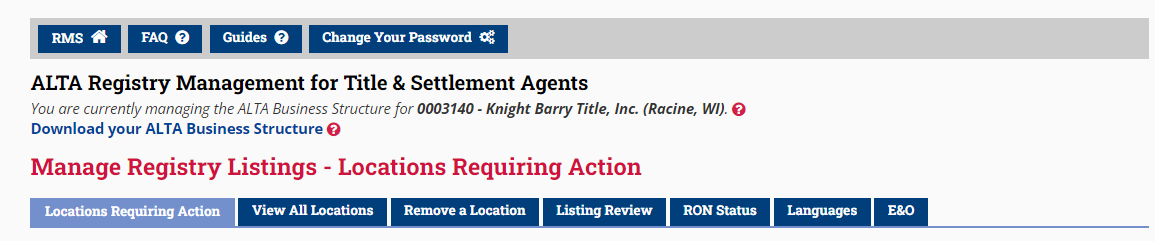
From the agent's Manage Registry Listing page, select the Remove a Location tab.
-
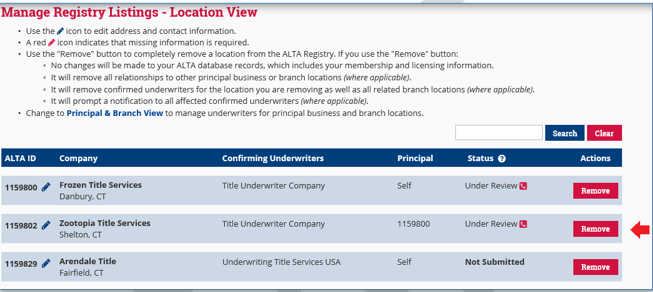
Click Remove next to the location that you would like to remove.
-
A location can be removed regardless of the Confirmation Status. If the location is not yet in the ALTA Registry, i.e., 'Under Review', all pending requests will be removed from the system.
-
Review message and click Cancel to return to the prior screen or Continue to complete the action.
