On This Page:
-
Program Overview
-
Technology and Professional Services Overview
-
How TIPAC Contributions are Made and Processed
-
TIPAC Recurring Donations - Setup and Cancellation
TIPAC Data in re:Members (formerly Impexium)
-
TIPAC Queries and Reports
-
How re:Members (formerly Impexium) Data is Transferred in Bulk to DDC
Program Overview:
-
TIPAC (Title Industry Political Action Committee) is the voluntary, non-partisan Political Action Committee (PAC) of the American Land Title Association. It is the only PAC that directly represents the interests of the title industry at the federal level in our nation’s political system. TIPAC raises money to help elect and re-elect candidates to Congress who understand and support the land title industry.
-
TIPAC maintains 2 donation programs, one which accepts contributions from individual people (“TIPAC” is the general reference) and another which accepts contributions from companies and is called the “TIPAC Education Fund.”
-
Individual contributors must be "eligible" to be solicited by TIPAC. That eligibility can be established by the individual joining ALTA's Title Action Network (TAN) or by their employer giving TIPAC permission to solicit all employees.
-
Contributors may make a pledge before they make their actual contribution.
-
Contributions may be made by personal check or credit card, or by cash (which is rare and limited to $100 or less).
Technology and Professional Services Overview:
-
ALTA’s Association Management Software (AMS) is re:Members (formerly Impexium).
-
All TIPAC contribution transactions are processed in re:Members (formerly Impexium). This is when the money actually goes into the bank. re:Members (formerly Impexium) batches flow through to ALTA’s financial management software.
-
Credit card transactions are processed by Anywhere Payments.
-
-
TIPAC’s specialized PAC software is Democracy Direct (also called DDC).
-
Contact and demographic information (also called “Contacts”) for contributors is exported from re:Members (formerly Impexium) and transferred to DDC via an automated overnight process.
-
Contribution transactions which were processed in re:Members (formerly Impexium) are manually entered into DDC, too, to support FEC reporting.
-
TIPAC Disbursements are set up in DDC. You may upload a disbursement budget into DDC as well.
-
-
TIPAC’s PAC compliance firm is Koch and Hoos. Koch & Hoos personnel (Tim Koch and Sutton Boyd) perform key functions for TIPAC:
-
Manually process contributions made by cash or check in re:Members (formerly Impexium) and enter corresponding data into DDC.
-
Deposit checks into TIPAC's bank account.
-
Track contributions made by credit card via ecommerce on the ALTA website or by ALTA staff directly into re:Members (formerly Impexium) and enter corresponding data into DDC.
-
Download information daily from TIPAC’s bank and payment processor to compare transaction information in re:Members (formerly Impexium)with data entered into DDC to ensure records are complete and accurate and that transactions have been fully processed.
-
Perform bank reconciliations.
-
Prepare and file FEC reports for TIPAC.
-
How TIPAC Contributions Are Made and Processed:
-
Personal TIPAC contributions may be made by an individual person by one of these methods:
-
Checks (with contribution card).. Contribution by check is fairly common.
-
Checks, along with contribution cards, are given to TIPAC staff directly by individual contributors.
-
Checks are delivered by courier (or FedEx or staff) to Koch & Hoos with the contribution cards. Copies of all checks and all contribution cards are retained by TIPAC staff.
-
Koch & Hoos deposits checks into the TIPAC bank account.
-
Contribution transactions are processed in re:Members (formerly Impexium) by Koch & Hoos and corresponding data is entered into DDC.
-
-
-
-
Cash Contributions
-
Cash contributions are rare and are limited to $100 or less when the donor is known. Anonymous cash contributions may be accepted for $50 or less.
-
Cash contributions should be documented with contribution cards.
-
Cash should be sent via FedEx to Chain Bridge Bank with a filled out deposit slip. Address Chain Bridge Bank, ATTN Branch Staff, 1445A Laughlin Ave, McLean, VA 22101
-
Send a copy of the contribution card to Koch & Hoos (with courier package or scan in and email).
-
Koch & Hoos will enter the information into re:Members (formerly Impexium).
-
-
-
Credit Card (handwritten on contribution card).
-
- Contribution transactions are processed in re:Members (formerly Impexium) by TIPAC staff. Corresponding data is entered into DDC by Koch & Hoos.
-
Credit Card (self-service using the ecommerce pages on the ALTA website).
-
Contributions by credit card may be processed by individual contributors directly on the ALTA website.
-
Full Pledge. Credit card payments may be made directly on the ALTA website. Corresponding data is entered into DDC by Koch & Hoos.
-
Individual contributors can set up installments (or ask TIPAC Staff to assist). Donors may choose monthly payments on the website. There is a quarterly option on the contribution card but these must be processed manually by TIPAC staff.
-
Reminder: the amount of the monthly/quarterly payment is the amount that is entered into the web form, not the full pledge amount.
-
A process in re:Members (formerly Impexium) must be set up in order to process monthly payments. See Recurring Donations section.
-
-
Corresponding data is entered into DDC by Koch & Hoos as each installment payment is made in the re:Members (formerly Impexium) system.
-
Email receipts for all transactions are sent to TIPAC staff from re:Members (formerly Impexium) and forwarded to Koch & Hoos for reconciliation.
-
-
-
Payment batches for TIPAC are set up in re:Members (formerly Impexium) using a standard naming convention.
-
TIPAC staff sets up Credit Card Batches for the Credit Card and ACH Transactions processed by TIPAC staff or by any ALTA staff member:
-
"TIPAC YYYYMMDD-CC" (e.g., "TIPAC 20210426-CC" for the Credit Card Batch dated April 26, 2021)
-
Only set up batches for the days in which a transaction is processed.
-
-
Koch & Hoos staff set up Check and Cash Batches as needed, named as follows:
-
"TIPAC YYYYMMDD-CHK" (e.g., "TIPAC 20210426-CHK" for the Check Batch dated April 26, 2021)
-
CHK can be followed by a hyphen and then a number (multiple deposits per day) and a letter (split for requirements) (e.g. "TIPAC 20210426-CHK-1a")
-
-
NOTE: There are multiple daily batches created by the system automatically for donor-self-serve transactions on the ALTA website.
- The naming convention for these is different and longer, and doesn't impact staff work.
-
Company TIPAC contributions to the TIPAC Education Fund may be made by company check or company credit card.
-
Company Check
-
ALTA accounting staff deposits funds into the TIPAC Education Fund account, notifies you via email to process the payment.
-
Copies of checks with be in the G Drive: G:\MEMBERSHIP\Remote Inbox\Deposits
-
ALTA accounting staff will email TIPAC staff with batch information.
-
To Process Payment
-
In re:Members (formerly Impexium), select the company donor (example: Knight Barry Title, Inc.), . Click on the BUY option at the top right.
-
Select Make a Donation
-
Check the box "Yes, I would like to make a donation to this cause."
-
Fill out the form. Make sure to enter the contact information of the person you sent the Ed Fund invoice to,
-
Choose check option and enter the check number. Check date should be the same as the batch date.
-
There is no corresponding data entered in DDC.
-
-
If there is a credit card contribution to the Ed Fund, follow the same steps, but select Credit Card payment and process from there.
-
TIPAC Recurring Donations - Set Up and Cancellation
See detailed process for TIPAC Recurring Donation Payments.
TIPAC Donation Eligibility
The TIPAC Fund "Price Attributes" in re:Members (formerly Impexium) require that an Individual is eligible to donate to TIPAC. If they are not eligible, neither they nor staff will be able to process a contribution. There are multiple paths to eligibility, and custom scripts that move data from one place to another. From the staff user perspective, there is a custom field called "Is TIPAC Eligible?" which must be checked (details and screen shots provided below). There are three ways that "Is TIPAC Eligible?" can be set/checked for an Individual record:
1. Permission to Solicit is Provided by Employer: Permission is set on Uber Parent and may be done by a PC (Primary Contact), Permission to Solicit Form Access (relationship), or a staff user, and the information flows down to all locations and individuals overnight. The most common scenario is that TIPAC staff process the permission in re:Members (formerly Impexium). Companies send a signed form to provide permission and the form is retained for compliance purposes.
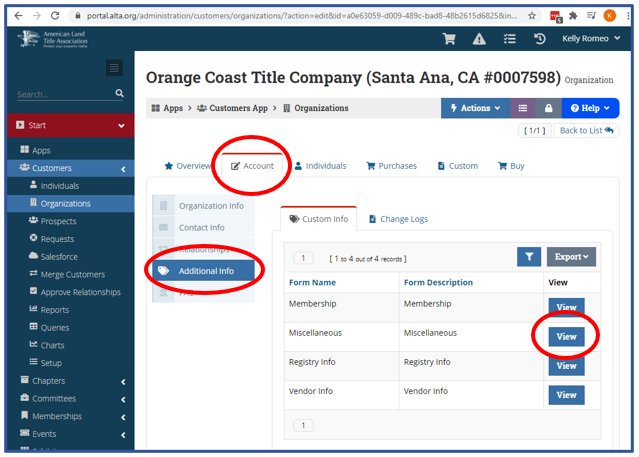
- On the Uber Parent Organization Record: Account > Additional Info > Custom Info > Miscellaneous "View"
-
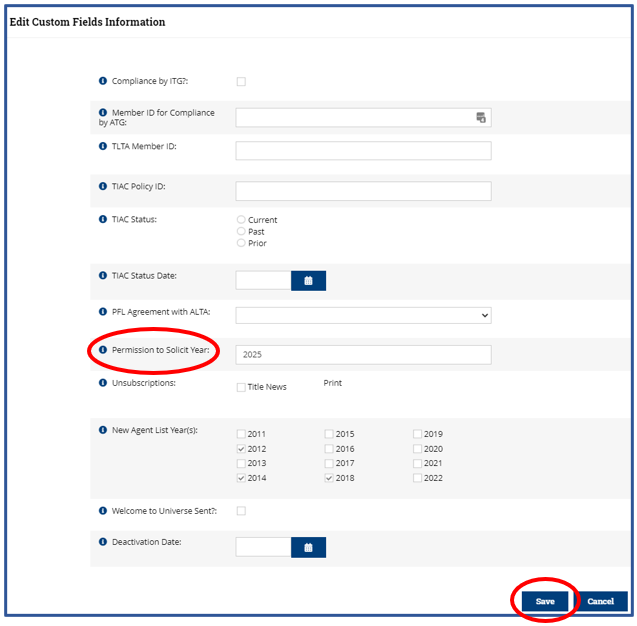
Look for "Permission to Solicit Year" in the pop-up box
-
Enter the last year of permission. For example, if the Organization has provided permission for 2021 through 2025, enter "2025"
-
Scroll down and click "Save"
-
The year can be set by staff in the re:Members (formerly Impexium) Admin Portal or by the PC or Permission user on the web site: https://www.alta.org/advocacy/tipac-solicit.cfm
-
Setting this date will not immediately check the "Is TIPAC Eligible?" for all employees. A custom script runs every few hours to update "Is TIPAC Eligible?" for each Individual in the business (including branch employees).
-
TIPAC staff may wish to spot-check subsidiaries of larger companies to ensure that the permission to solicit has flowed down properly to company locations and individuals.
2. The Individual is a current TAN Member
-
When a person "Joins TAN" on the web site (https://www.alta.org/tan/join-tan.cfm) or a staff user uses the Intranet to set Current TAN memberships, several things happen.
-
Their actual TAN membership is set in Custom Data Tables.
-
The Individual Custom field "Has Current TAN Subscription?" is checked. This is for easier reporting and queries.
-
The Individual Custom field "Is TIPAC Eligible?" is checked.
-
-
Once this is done, they can immediately contribute.
-
There is another custom script which checks the actual "subscription" and if current, makes sure the two above are checked as well, in case the TAN was updated manually.
3. The Individual has "Is TIPAC Eligible?" checked manually by a Staff User
-
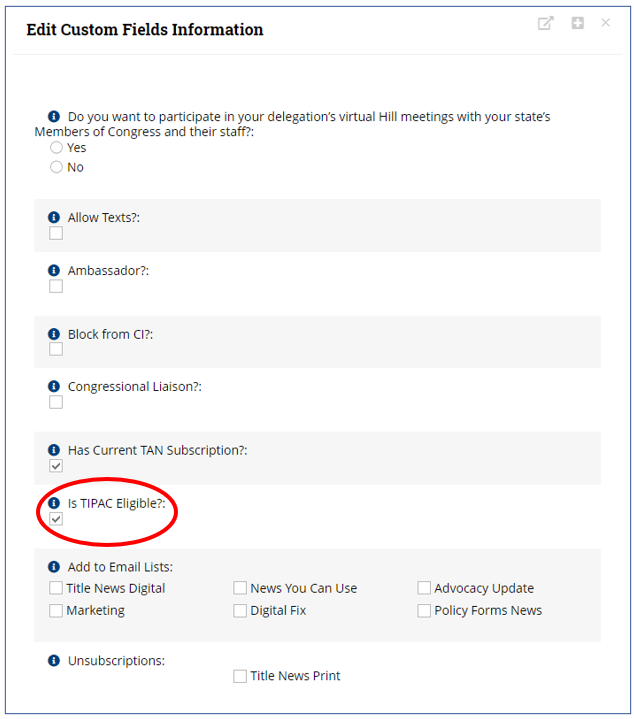
"Is TIPAC Eligible" can be set manually by a Staff User if the Individual should be able to contribute without otherwise being eligible, or if there is a need for them to immediately be able to if the Uber Parent's Permission hasn't updated overnight yet. If this is set but they don't meet one of the requirements above, they technically are NOT eligible by the current definition, so they should then make sure to Join TAN, etc.
-
On the Individual Record: Account > Additional Info > Custom Info > Individual Miscellaneous "View"
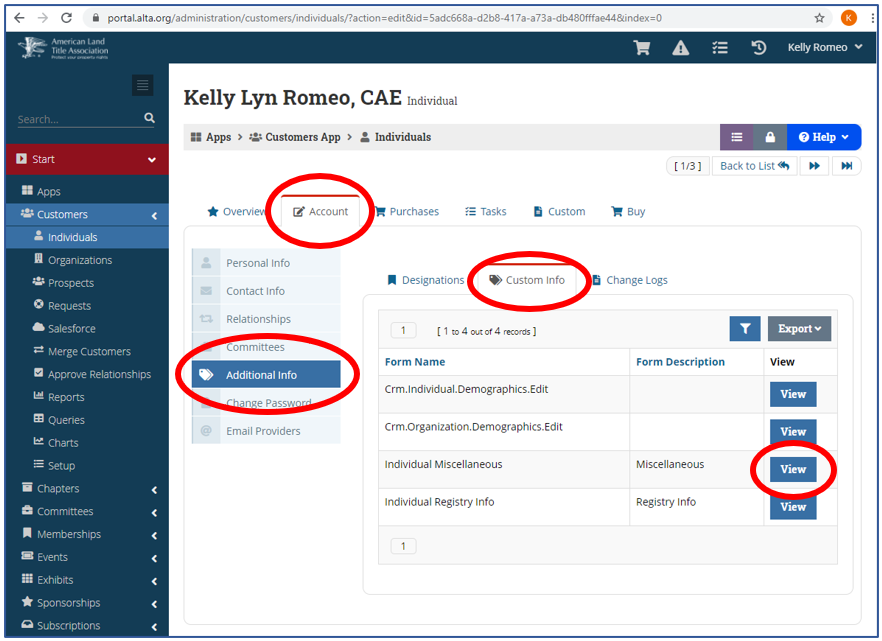
- Look for "Is TIPAC Eligible?" and the corresponding checkbox.
Contributions and Pledges
-
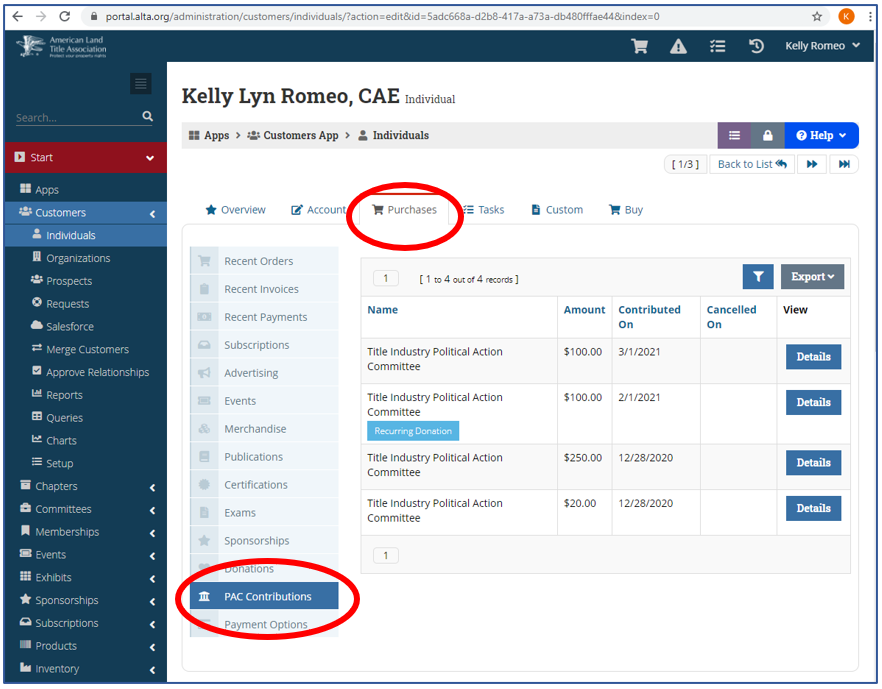
TIPAC Contribution Transactions in re:Members (formerly Impexium) (transactions occurring 1/1/2021 and later)
- On the Individual Record: Purchases > PAC Contributions
-
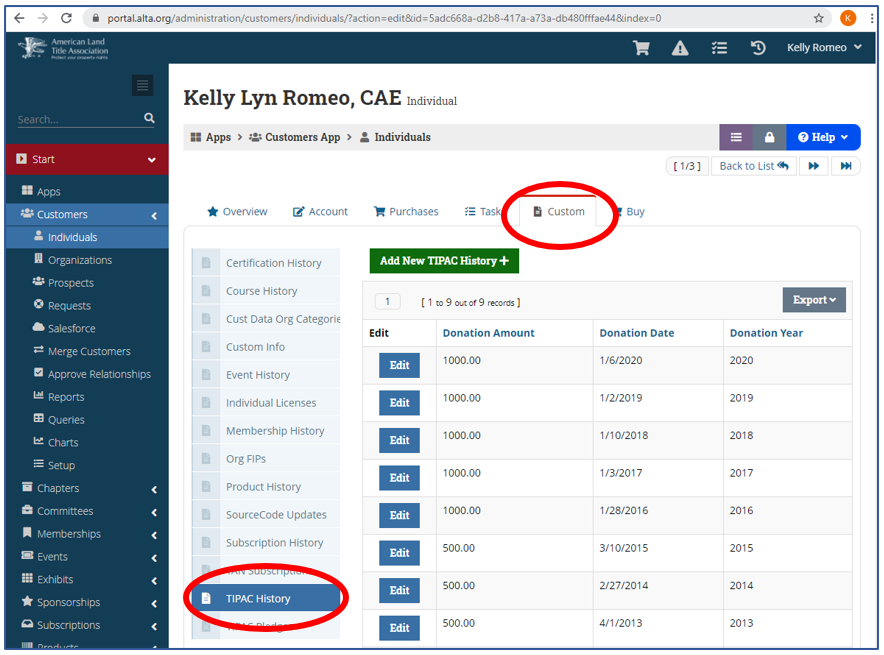
TIPAC Contribution History (Prior to 1/1/2021)
- On the Individual Record: Custom > TIPAC History
-
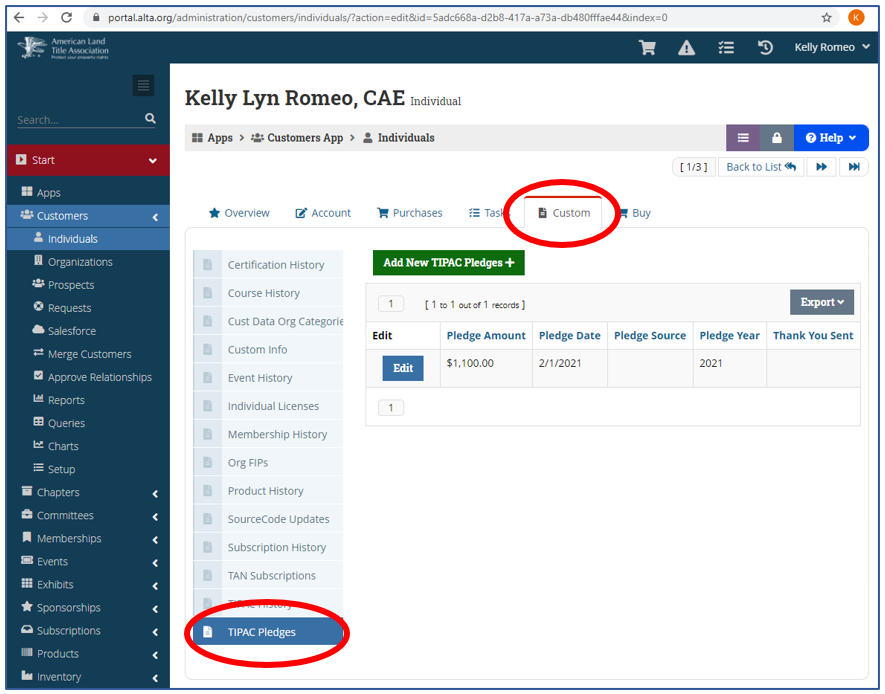
TIPAC Pledges MUST BE ENTERED FOR EACH TRANSACTION
-
On the Individual Record: Custom > TIPAC Pledges
-
There can be multiple pledges per year. This helps TIPAC staff keep track of the amount raised by an individual, company, event or campaign.
-
This tracks the pledge amount, date made, pledge source/campaign, pledge year, and if a thank you note was sent.
-
To ensure all pledges have been entered, check re:Members (formerly Impexium): Queries: Query Center: TIPAC Pledges. Search by year.
-
This data is sent to the Thaddeus data warehouse at https://dw.alta.org. The TIPAC dashboard is used for the Board Books.
-
TIPAC Queries and Reports:
-
TAN & TIPAC Dashboards: https://dw.alta.org/dashboard-tan-tipac.php
-
TAN & TIPAC Exports: https://dw.alta.org/exports/advocacy.php
- The monthly data is straightforward, but there still is work to do in providing bottom line numbers to replace the Excel spreadsheets fully (Chad+Leah)
How re:Members (formerly Impexium) Data is Transferred in Bulk to DDC:
-
DDC is capable of importing, from a file, two kind of data: “Contacts” and “Receipts”
-
Contacts file transfer:
-
ALTA has been exporting TIPAC Contacts data daily for years. A short computer program (also called a script) run at about 2am ET. An export file is created from re:Members (formerly Impexium) and saved to a designated folder in the DDC platform. A DDC process "looks" in that folder every morning for a new file and, if a new file is there, imports the Contacts data into DDC. A confirmation email is sent to support@alta.org and reviewed by ALTA IT staff.
-
The Contacts data file includes all Individuals who have made, or are eligible to make, a TIPAC Contribution as well as their parent/employer Organization. The result is that their contact information is always current in DDC and their records are available to Koch & Hoos personnel for data entry and for FEC reporting.
-
The following data points are included in the Contacts file (technical data names in parenthesis):
-
Individual or Organization ALTA ID (constit_id)
-
Record Type (org_ind or "CO" or "CI")
-
Prefix (prefix)
-
First Name (fname)
-
Nickname (nickname)
-
Middle Name (mname)
-
Last Name (lname)
-
Suffix (suffix)
-
Title (title)
-
Individual's Parent/Employer ALTA ID (parent_id)
-
Company Name (company)
-
TIPAC Contributor Indicator (donor_flag ("donor"))
-
TAN Membership Expire Date (tan_date)
-
TAN Indicator (tan_flag of either ("currentTAN", "expiredTAN")
-
Status (current_status ("Deceased"))
-
Home Address Line 1 (Hline1)
-
Home Address Line 2 (Hline2)
-
Home Address City (Hcity)
-
Home Address State (Hstate)
-
Home Address Zip Code (Hzip)
-
Business Address Line 1 (Oline1)
-
Business Address Line 2 (Oline2)
-
Business Address City (Ocity)
-
Business Address State (Ostate)
-
Business Address Zip Code (Ozip)
-
Home Phone (Hphone)
-
Mobile Phone (Mphone)
-
Business Phone (Ophone)
-
Fax (Fax)
-
Business Email (email)
-
-
Receipts file transfer. This capability is in development. See the Project Outline at TIPAC Project - Bulk Transfer of IMP Receipts to DDC.
-
-
